
CV Revamp and ATS
What Is an ATS and How Does It Read Your CV?
If you’ve ever applied for a job online and never received a response, your CV may not have made it past the Applicant Tracking System (ATS).
Many job seekers spend hours creating visually appealing CVs, only to discover that a computer program—not a recruiter—was the first to review their application. Understanding how ATS software works can significantly improve your chances of landing interviews.
What Is an ATS?
An Applicant Tracking System (ATS) is software used by employers and recruitment agencies to manage job applications. It helps companies scan, sort, filter, and rank CVs before they are reviewed by a hiring manager.
With some vacancies receiving hundreds or even thousands of applications, ATS software allows recruiters to quickly identify candidates who best match the job requirements.
How Does an ATS Read Your CV?
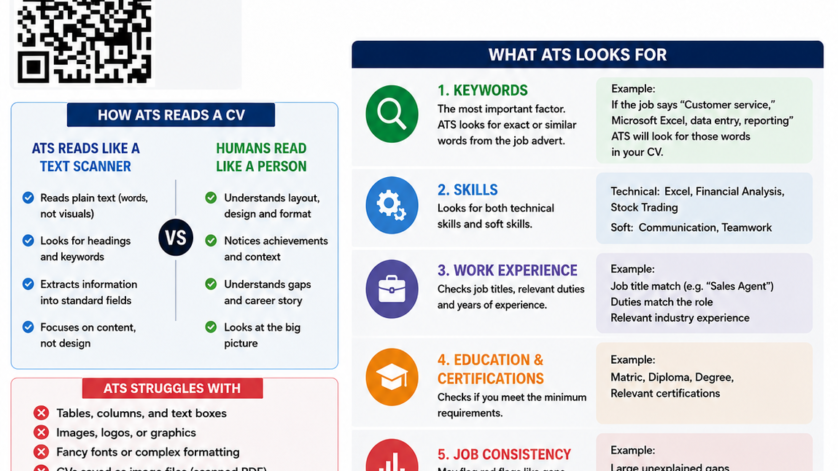
Unlike a human recruiter, an ATS does not view your CV as a designed document. Instead, it reads your CV as text and extracts information into specific categories.
When you submit your CV, the ATS typically:
- Scans the document.
- Extracts key information such as your name, contact details, work experience, education, and skills.
- Stores the information in a searchable database.
- Compares your qualifications against the job description.
- Assigns a relevance score or ranking.
- Presents the most relevant candidates to recruiters.
This means your CV may be filtered out before a human ever sees it.
What Does an ATS Look For?
1. Keywords
Keywords are the most important factor in ATS screening.
For example, if a job advert mentions:
- Customer Service
- Microsoft Excel
- Data Entry
- Reporting
The ATS will search for those exact terms or closely related phrases within your CV.
The more relevant keywords your CV contains, the stronger your match score is likely to be.
2. Skills
ATS software looks for both technical and soft skills.
Examples of technical skills:
- Microsoft Excel
- Financial Analysis
- Data Analysis
- Stock Trading
- Inventory Management
Examples of soft skills:
- Communication
- Teamwork
- Leadership
- Problem Solving
3. Relevant Work Experience
The ATS analyses:
- Job titles
- Duties and responsibilities
- Industry experience
- Length of employment
Your experience should clearly demonstrate how your previous roles relate to the position you are applying for.
4. Education and Certifications
Many employers set minimum educational requirements. The ATS checks whether your qualifications meet those requirements.
Examples include:
- Matric
- National Certificate
- Diploma
- Degree
- Professional Certifications
5. Employment History
Some ATS platforms may identify potential concerns such as:
- Large employment gaps
- Frequent job changes
- Missing dates
While these factors don’t automatically disqualify you, recruiters may review them more closely.
What ATS Struggles to Read
Many job seekers unknowingly create CVs that are difficult for ATS software to interpret.
Avoid:
- Tables
- Multiple columns
- Text boxes
- Graphics and images
- Logos
- Fancy fonts
- Scanned PDF files
- Important information placed in headers or footers
These elements can confuse ATS software and prevent it from extracting your information correctly.
How to Create an ATS-Friendly CV
Follow these simple guidelines:
Use Simple Formatting
Keep your CV clean and professional. Use a single-column layout with standard fonts and clear spacing.
Use Standard Headings
ATS systems recognise common headings such as:
- Personal Details
- Professional Summary
- Work Experience
- Education
- Skills
- Certifications
Match Keywords to the Job Description
Carefully read the vacancy and incorporate relevant keywords naturally into your CV.
Save in the Correct Format
Most employers accept:
- Microsoft Word (.docx)
- Standard PDF documents
Avoid uploading scanned images of your CV.
Tailor Your CV for Every Application
One generic CV is rarely effective. Adjust your skills, experience, and profile summary to align with each position you apply for.
Think of ATS as a Keyword Filter
A simple way to understand ATS software is to think of it as a keyword filter.
If your CV contains the qualifications, skills, and experience the employer is looking for, it is more likely to pass through the system and reach a recruiter.
If your CV lacks those keywords or uses complicated formatting, it may be filtered out regardless of your qualifications.
Final Thoughts
Understanding how Applicant Tracking Systems work can give you a significant advantage in today’s job market. A well-structured, keyword-optimised CV improves your chances of passing the initial screening process and getting your application in front of a real recruiter.
Before submitting your next application, ask yourself: Is my CV designed for recruiters—or for the ATS that reviews it first?
Making a few simple changes could be the difference between being overlooked and being invited for an interview.